This article talks about on how to create Teams update policies in Teams admin center
Teams update policies
Teams Update policies are used to manage Teams and Office preview users that will see pre-release or preview features in the Teams app. You can use the Global (Org-wide default) policy and customize it, or create one or more custom policies for your users.
Lets create Teams Update policies step by step
Open Teams admin center aka TAC : https://admin.teams.microsoft.com/
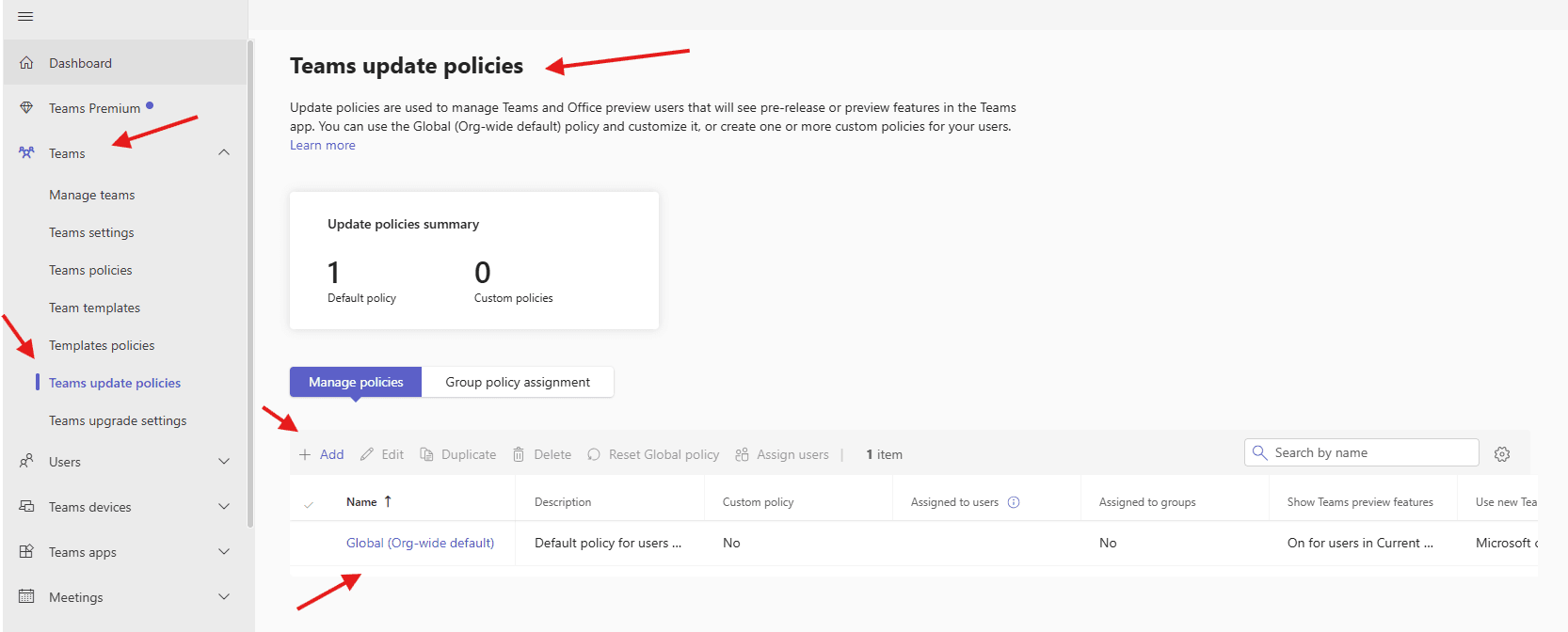
Navigate to Teams –> Teams update policies –> manage policies –> add
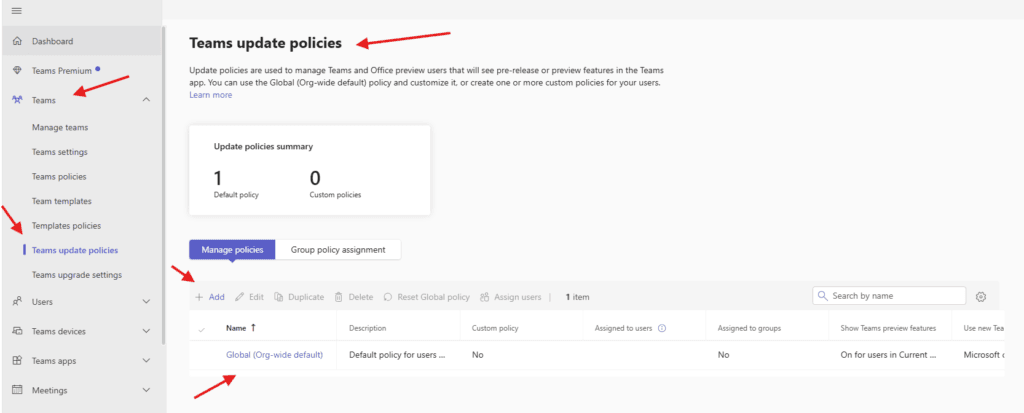
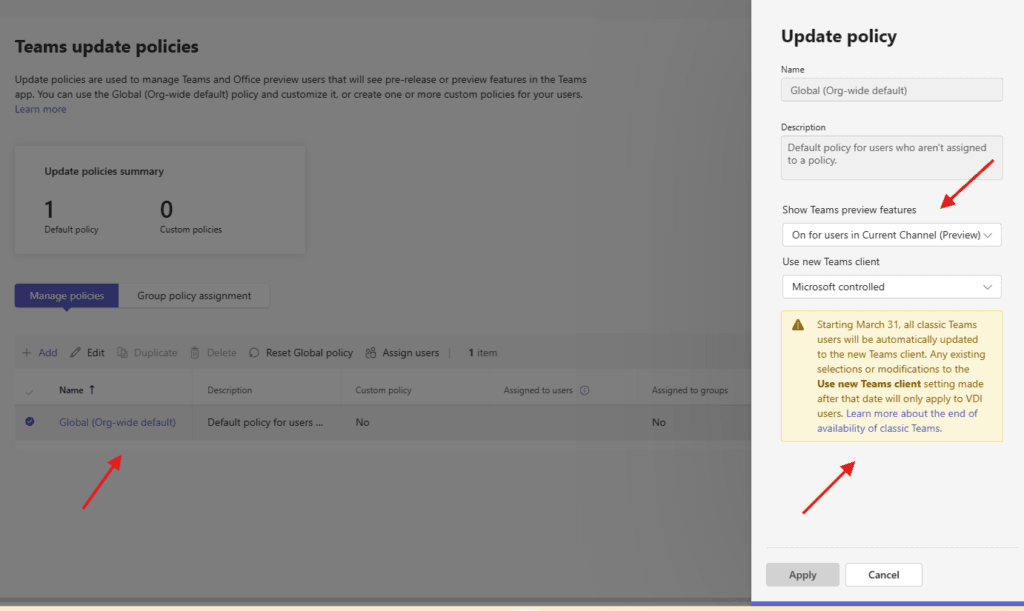
Let me show you how does Global policy looks like
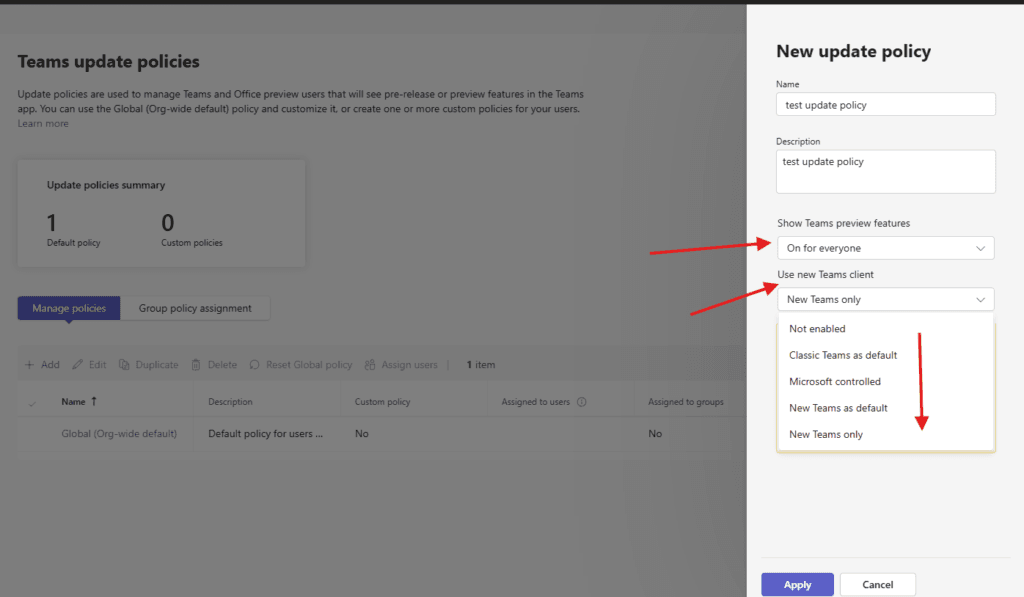
now lets create one test policy –> give a suitable title and select show teams preview features ( choose suitable option)
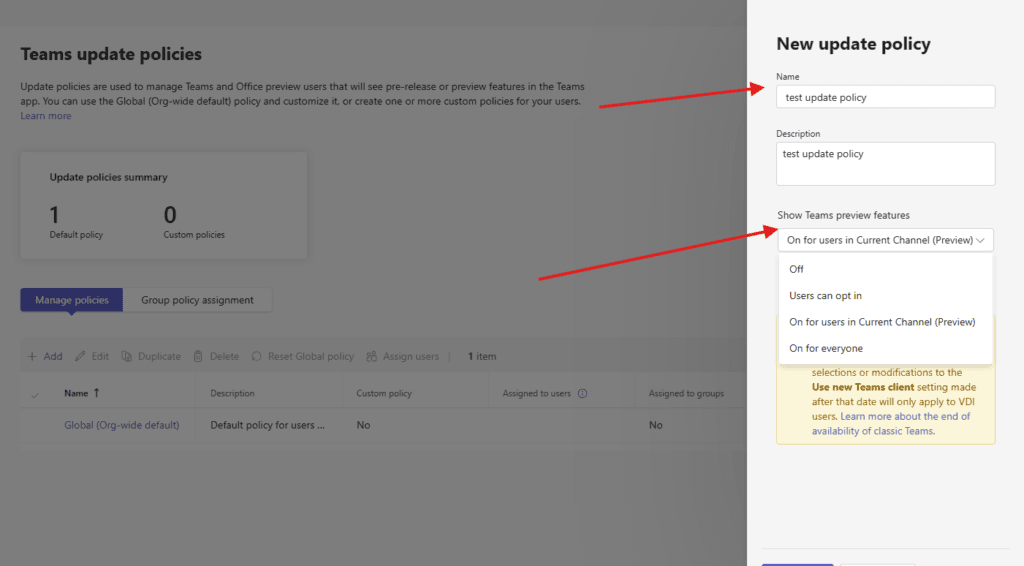
In the Show Teams preview features I have selected everyone as per my requirement and under Use new Teams client I have selected new teams only ( so that all my users will get Teams v2 as a default Teams app)
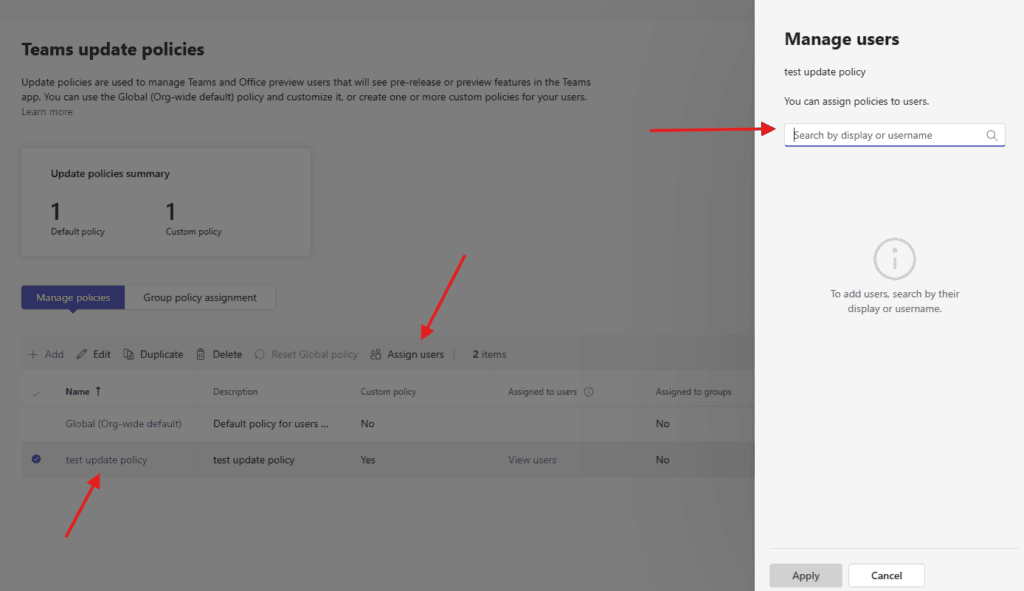
you can assign created policy to users
PowerShell script for above manual task
Install required modules (run as Administrator)

Set-ExecutionPolicy -ExecutionPolicy RemoteSigned -Scope CurrentUser -Force

Install Microsoft Teams PowerShell module

Install-Module -Name MicrosoftTeams -Force -AllowClobber

Connect to Microsoft Teams
# Install required modules (run as Administrator)
Set-ExecutionPolicy -ExecutionPolicy RemoteSigned -Scope CurrentUser -Force

# Install Microsoft Teams PowerShell module
Install-Module -Name MicrosoftTeams -Force -AllowClobber

# Connect to Microsoft Teams
Connect-MicrosoftTeams

# Teams Update Policy Creation Script
# ========================================

# Function to display menu
function Show-Menu {
    Clear-Host
    Write-Host "========================================" -ForegroundColor Cyan
    Write-Host "   Teams Update Policy Creator" -ForegroundColor Cyan
    Write-Host "========================================" -ForegroundColor Cyan
    Write-Host ""
    Write-Host "1. Create a new Update Policy"
    Write-Host "2. List existing Update Policies"
    Write-Host "3. View detailed policy information"
    Write-Host "4. Assign policy to a user"
    Write-Host "5. Assign policy to all users"
    Write-Host "6. Remove a policy"
    Write-Host "7. Exit"
    Write-Host ""
    Write-Host "========================================" -ForegroundColor Cyan
}

# Function to create a new update policy
function New-TeamsUpdatePolicy {
    param(
        [string]$PolicyName,
        [string]$Description,
        [string]$UpdateChannel,
        [int]$NotificationLevel,
        [bool]$AllowPreview
    )

    try {
        # Create the new policy
        $policy = New-CsTeamsUpdatePolicy `
            -Identity $PolicyName `
            -Description $Description `
            -NotificationLevel $NotificationLevel

        # Set additional properties if provided
        if ($UpdateChannel) {
            $policy = Set-CsTeamsUpdatePolicy -Identity $PolicyName -UpdateChannel $UpdateChannel
        }

        if ($AllowPreview) {
            $policy = Set-CsTeamsUpdatePolicy -Identity $PolicyName -AllowPreview $AllowPreview
        }

        Write-Host "`nPolicy '$PolicyName' created successfully!" -ForegroundColor Green
        Write-Host "Policy ID: $($policy.Identity)" -ForegroundColor Yellow

        return $policy
    }
    catch {
        Write-Host "Error creating policy: $_" -ForegroundColor Red
        return $null
    }
}

# Function to create predefined update policies
function Create-PredefinedPolicies {
    Write-Host "`nCreating predefined policies..." -ForegroundColor Cyan

    # Policy 1: Standard User Policy
    $standardPolicy = @{
        PolicyName = "StandardUserUpdatePolicy"
        Description = "Standard update policy for regular users"
        UpdateChannel = "Current"
        NotificationLevel = 2  # Normal notifications
        AllowPreview = $false
    }
    New-TeamsUpdatePolicy @standardPolicy

    # Policy 2: IT Admin Policy
    $adminPolicy = @{
        PolicyName = "ITAdminUpdatePolicy"
        Description = "Update policy for IT administrators"
        UpdateChannel = "Current"
        NotificationLevel = 1  # Minimal notifications
        AllowPreview = $true
    }
    New-TeamsUpdatePolicy @adminPolicy

    # Policy 3: Executive Policy
    $execPolicy = @{
        PolicyName = "ExecutiveUpdatePolicy"
        Description = "Update policy for executives"
        UpdateChannel = "Current"
        NotificationLevel = 3  # Enhanced notifications
        AllowPreview = $false
    }
    New-TeamsUpdatePolicy @execPolicy

    # Policy 4: Delayed Updates
    $delayedPolicy = @{
        PolicyName = "DelayedUpdatePolicy"
        Description = "Delayed updates for testing"
        UpdateChannel = "Deferred"
        NotificationLevel = 1
        AllowPreview = $false
    }
    New-TeamsUpdatePolicy @delayedPolicy
}

# Function to create custom policy
function Create-CustomPolicy {
    Clear-Host
    Write-Host "=== Create Custom Update Policy ===" -ForegroundColor Cyan

    $policyName = Read-Host "Enter policy name (alphanumeric, no spaces)"
    $description = Read-Host "Enter policy description"

    Write-Host "`nSelect update channel:"
    Write-Host "1. Current (default)"
    Write-Host "2. Deferred"
    Write-Host "3. FirstRelease"
    $channelChoice = Read-Host "Enter choice (1-3)"

    $updateChannel = switch($channelChoice) {
        "1" { "Current" }
        "2" { "Deferred" }
        "3" { "FirstRelease" }
        default { "Current" }
    }

    Write-Host "`nSelect notification level:"
    Write-Host "1. None - No notifications"
    Write-Host "2. Minimal - Basic notifications"
    Write-Host "3. Normal (recommended)"
    Write-Host "4. Enhanced - More detailed notifications"
    $notifChoice = Read-Host "Enter choice (1-4)"

    $notificationLevel = switch($notifChoice) {
        "1" { 0 }
        "2" { 1 }
        "3" { 2 }
        "4" { 3 }
        default { 2 }
    }

    $allowPreview = Read-Host "Allow preview versions? (Y/N)" -eq 'Y'

    New-TeamsUpdatePolicy -PolicyName $policyName -Description $description `
        -UpdateChannel $updateChannel -NotificationLevel $notificationLevel `
        -AllowPreview $allowPreview

    Pause
}

# Function to list all policies
function List-AllPolicies {
    Clear-Host
    Write-Host "=== Existing Update Policies ===" -ForegroundColor Cyan
    $policies = Get-CsTeamsUpdatePolicy

    if ($policies.Count -eq 0) {
        Write-Host "No custom policies found." -ForegroundColor Yellow
        Write-Host "Only the global policy exists." -ForegroundColor Yellow
    }
    else {
        $policies | Format-Table Identity, Description, NotificationLevel, UpdateChannel, AllowPreview -AutoSize
    }

    Pause
}

# Function to view policy details
function View-PolicyDetails {
    Clear-Host
    Write-Host "=== Policy Details ===" -ForegroundColor Cyan

    $policies = Get-CsTeamsUpdatePolicy
    $policyList = @()
    $i = 1

    foreach ($policy in $policies) {
        Write-Host "$i. $($policy.Identity)"
        $policyList += $policy
        $i++
    }

    $choice = Read-Host "`nSelect policy number to view details"

    if ($choice -match '^\d+$' -and [int]$choice -le $policyList.Count) {
        $selectedPolicy = $policyList[[int]$choice - 1]
        Write-Host "`n=== Details for $($selectedPolicy.Identity) ===" -ForegroundColor Green
        $selectedPolicy | Format-List *
    }
    else {
        Write-Host "Invalid selection" -ForegroundColor Red
    }

    Pause
}

# Function to assign policy to user
function Assign-PolicyToUser {
    Clear-Host
    Write-Host "=== Assign Policy to User ===" -ForegroundColor Cyan

    $userPrincipalName = Read-Host "Enter user's UPN (e.g., user@domain.com)"
    $policies = Get-CsTeamsUpdatePolicy
    $policyList = @()
    $i = 1

    foreach ($policy in $policies) {
        Write-Host "$i. $($policy.Identity)"
        $policyList += $policy
        $i++
    }

    $choice = Read-Host "`nSelect policy number to assign"

    if ($choice -match '^\d+$' -and [int]$choice -le $policyList.Count) {
        $selectedPolicy = $policyList[[int]$choice - 1]

        try {
            Grant-CsTeamsUpdatePolicy -Identity $userPrincipalName -PolicyName $selectedPolicy.Identity
            Write-Host "`nPolicy '$($selectedPolicy.Identity)' assigned to $userPrincipalName successfully!" -ForegroundColor Green
        }
        catch {
            Write-Host "Error assigning policy: $_" -ForegroundColor Red
        }
    }
    else {
        Write-Host "Invalid selection" -ForegroundColor Red
    }

    Pause
}

# Function to assign policy to all users
function Assign-PolicyToAllUsers {
    Clear-Host
    Write-Host "=== Assign Policy to All Users ===" -ForegroundColor Cyan
    Write-Host "WARNING: This will assign the policy to ALL users in your tenant!" -ForegroundColor Yellow
    Write-Host "This operation may take some time depending on the number of users.`n" -ForegroundColor Yellow

    $confirmation = Read-Host "Are you sure you want to continue? (Y/N)"

    if ($confirmation -ne 'Y') {
        Write-Host "Operation cancelled." -ForegroundColor Yellow
        Pause
        return
    }

    $policies = Get-CsTeamsUpdatePolicy
    $policyList = @()
    $i = 1

    foreach ($policy in $policies) {
        Write-Host "$i. $($policy.Identity)"
        $policyList += $policy
        $i++
    }

    $choice = Read-Host "`nSelect policy number to assign to all users"

    if ($choice -match '^\d+$' -and [int]$choice -le $policyList.Count) {
        $selectedPolicy = $policyList[[int]$choice - 1]

        try {
            # Get all users
            $users = Get-CsOnlineUser | Where-Object {$_.TeamsUpdatePolicy -eq $null -or $_.TeamsUpdatePolicy -ne $selectedPolicy.Identity}

            if ($users.Count -eq 0) {
                Write-Host "No users found or all users already have this policy." -ForegroundColor Yellow
            }
            else {
                Write-Host "`nAssigning policy to $($users.Count) users..." -ForegroundColor Cyan

                $count = 0
                foreach ($user in $users) {
                    try {
                        Grant-CsTeamsUpdatePolicy -Identity $user.UserPrincipalName -PolicyName $selectedPolicy.Identity
                        $count++
                        Write-Progress -Activity "Assigning Policy" -Status "Processed $count of $($users.Count) users" -PercentComplete (($count / $users.Count) * 100)
                    }
                    catch {
                        Write-Host "Failed to assign policy to $($user.UserPrincipalName): $_" -ForegroundColor Red
                    }
                }

                Write-Host "`nSuccessfully assigned policy to $count users!" -ForegroundColor Green
            }
        }
        catch {
            Write-Host "Error: $_" -ForegroundColor Red
        }
    }
    else {
        Write-Host "Invalid selection" -ForegroundColor Red
    }

    Pause
}

# Function to remove a policy
function Remove-TeamsUpdatePolicy {
    Clear-Host
    Write-Host "=== Remove Update Policy ===" -ForegroundColor Cyan

    $policies = Get-CsTeamsUpdatePolicy | Where-Object {$_.Identity -ne "Global"}

    if ($policies.Count -eq 0) {
        Write-Host "No custom policies to remove." -ForegroundColor Yellow
        Pause
        return
    }

    $policyList = @()
    $i = 1

    foreach ($policy in $policies) {
        Write-Host "$i. $($policy.Identity)"
        $policyList += $policy
        $i++
    }

    $choice = Read-Host "`nSelect policy number to remove"

    if ($choice -match '^\d+$' -and [int]$choice -le $policyList.Count) {
        $selectedPolicy = $policyList[[int]$choice - 1]

        $confirmation = Read-Host "Are you sure you want to remove policy '$($selectedPolicy.Identity)'? (Y/N)"

        if ($confirmation -eq 'Y') {
            try {
                Remove-CsTeamsUpdatePolicy -Identity $selectedPolicy.Identity -Force
                Write-Host "`nPolicy '$($selectedPolicy.Identity)' removed successfully!" -ForegroundColor Green
            }
            catch {
                Write-Host "Error removing policy: $_" -ForegroundColor Red
            }
        }
        else {
            Write-Host "Operation cancelled." -ForegroundColor Yellow
        }
    }
    else {
        Write-Host "Invalid selection" -ForegroundColor Red
    }

    Pause
}

# Main script execution
Clear-Host
Write-Host "Microsoft Teams Update Policy Manager" -ForegroundColor Cyan
Write-Host "=====================================`n"

# Check if connected to Teams
try {
    $test = Get-CsTeamsUpdatePolicy -ErrorAction Stop
    Write-Host "Connected to Microsoft Teams successfully!`n" -ForegroundColor Green
}
catch {
    Write-Host "Not connected to Microsoft Teams." -ForegroundColor Red
    Write-Host "Please run: Connect-MicrosoftTeams`n" -ForegroundColor Yellow
    exit
}

# Main menu loop
do {
    Show-Menu
    $choice = Read-Host "`nSelect an option (1-7)"

    switch ($choice) {
        "1" {
            Clear-Host
            Write-Host "=== Create Update Policy ===" -ForegroundColor Cyan
            Write-Host "1. Create predefined policies"
            Write-Host "2. Create custom policy"
            $subChoice = Read-Host "`nSelect option (1-2)"

            switch ($subChoice) {
                "1" { Create-PredefinedPolicies }
                "2" { Create-CustomPolicy }
                default { Write-Host "Invalid option" -ForegroundColor Red; Pause }
            }
        }
        "2" { List-AllPolicies }
        "3" { View-PolicyDetails }
        "4" { Assign-PolicyToUser }
        "5" { Assign-PolicyToAllUsers }
        "6" { Remove-TeamsUpdatePolicy }
        "7" {
            Write-Host "`nGoodbye!" -ForegroundColor Green
            exit
        }
        default {
            Write-Host "Invalid option. Please try again." -ForegroundColor Red
            Pause
        }
    }
} while ($true)
Conclusion:
Post reading above article user will be able to create Teams update policies in Teams admin center
You can also read this article https://microbrother.com/how-to-create-or-edit-teams-templates-policies/ to create or edit teams template policies
😇