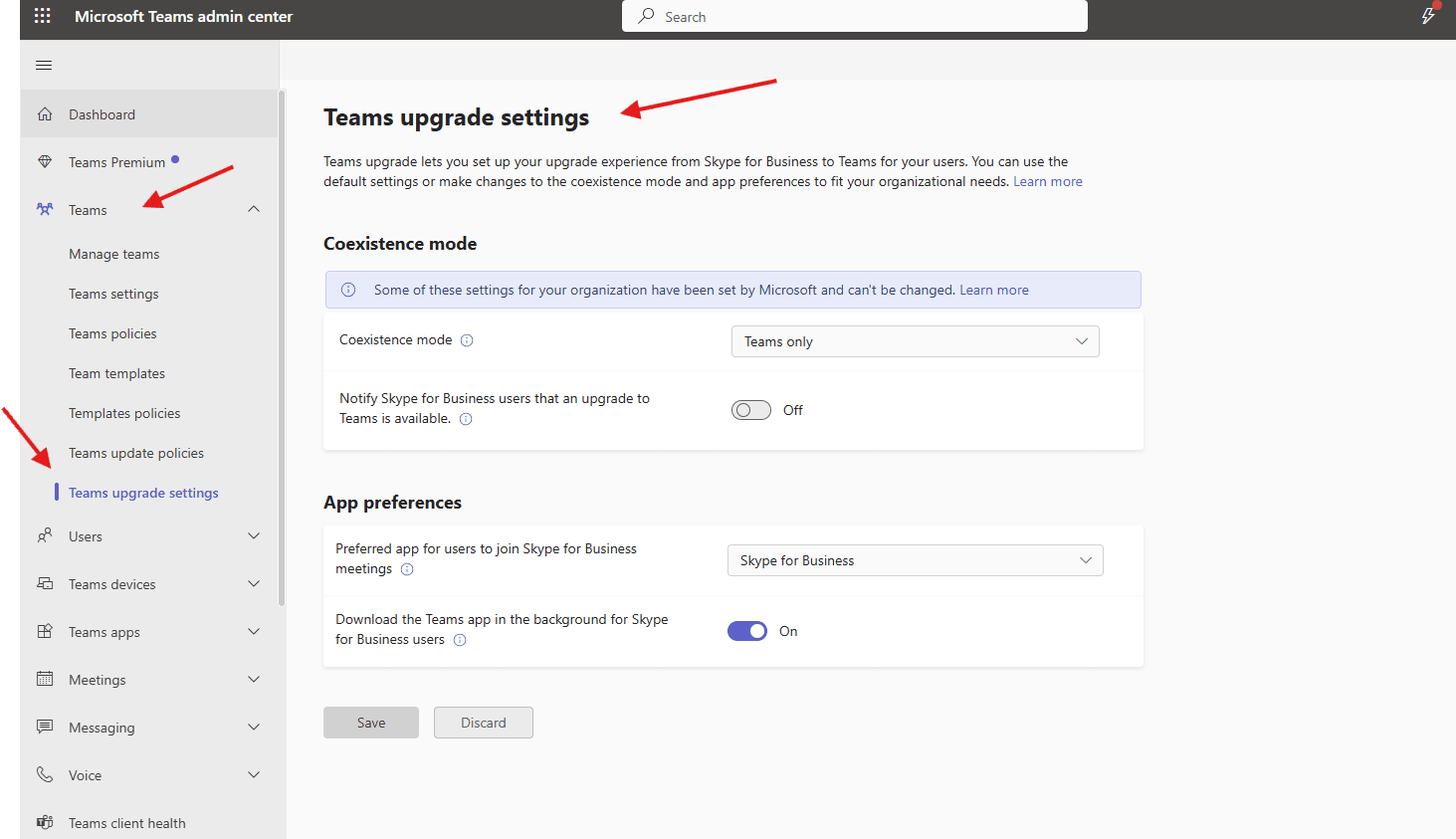
This article talks about on how to create Teams upgrade settings in TAC
Teams upgrade settings
Teams upgrade settings lets you set up your upgrade experience from Skype for Business to Teams for your users. You can use the default settings or make changes to the coexistence mode and app preferences to fit your organizational needs
Lets create Teams upgrade settings step by step
Login to Teams admin center : https://admin.teams.microsoft.com/
Navigate to Teams –> Teams upgrade settings
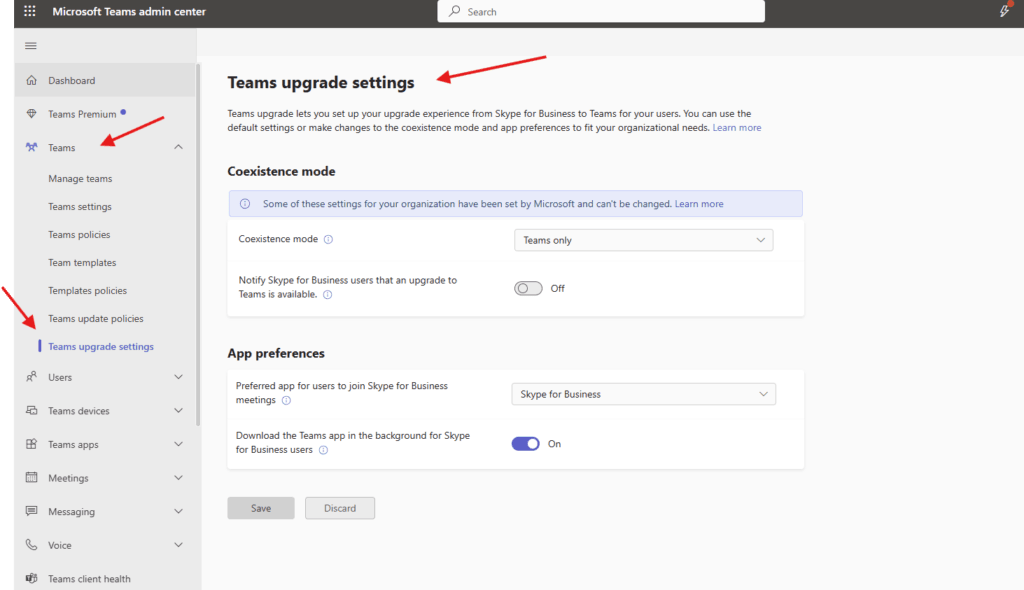
Coexistence mode–> The Coexistence mode that is used determines both routing of incoming calls and chats and the app that is used by the user to initiate chats and calls or to schedule meetings. my tenant is directly create in M365 hence I am not getting drip down option
If I have SFB on premise and Teams both together then I would have got drop down and in that different options read this article for detailed explanation : https://learn.microsoft.com/en-us/microsoftteams/teams-and-skypeforbusiness-coexistence-and-interoperability
Notify Skype for Business users that an upgrade to Teams is available –> If this setting is turned on, your users will see a yellow banner in their Skype for Business app telling them that they will soon be upgraded to Teams.
Preferred app for users to join Skype for Business meetings–> This sets the app is used for joining Skype for Business meetings and isn’t dependent on the Coexistence mode setting.
Download the Teams app in the background for Skype for Business users –> This setting downloads the Teams app in the background for users running the Skype for Business app on Windows PCs. This happens if the Coexistence mode for the user is Teams Only, or if a pending upgrade notification is enabled in the Skype for Business app.
PowerShell script for above Teams Upgrade manual task
# Teams Upgrade Settings PowerShell Script
# Controls Skype for Business to Teams migration settings
# ========================================================
# Prerequisites Check
function Test-Prerequisites {
Write-Host "Checking prerequisites..." -ForegroundColor Cyan
# Check if running as administrator
$isAdmin = ([Security.Principal.WindowsPrincipal] [Security.Principal.WindowsIdentity]::GetCurrent()).IsInRole([Security.Principal.WindowsBuiltInRole] "Administrator")
if (-not $isAdmin) {
Write-Host "Warning: Some features may require Administrator privileges." -ForegroundColor Yellow
}
# Check for required modules
$requiredModules = @("MicrosoftTeams", "SkypeOnlineConnector")
foreach ($module in $requiredModules) {
if (-not (Get-Module -ListAvailable -Name $module)) {
Write-Host "Module $module not found. Installing..." -ForegroundColor Yellow
try {
Install-Module -Name $module -Force -AllowClobber -ErrorAction Stop
Write-Host "Module $module installed successfully." -ForegroundColor Green
}
catch {
Write-Host "Failed to install $module. Please install manually." -ForegroundColor Red
return $false
}
}
}
# Import modules
Import-Module MicrosoftTeams -Force
Import-Module SkypeOnlineConnector -Force
return $true
}
# Connect to Services
function Connect-Services {
Write-Host "`nConnecting to services..." -ForegroundColor Cyan
try {
# Connect to Microsoft Teams
Write-Host "Connecting to Microsoft Teams..." -ForegroundColor Yellow
Connect-MicrosoftTeams -ErrorAction Stop
Write-Host "Connected to Microsoft Teams." -ForegroundColor Green
# Connect to Skype for Business Online
Write-Host "Connecting to Skype for Business Online..." -ForegroundColor Yellow
$sfbSession = New-CsOnlineSession -ErrorAction Stop
Import-PSSession $sfbSession -AllowClobber
Write-Host "Connected to Skype for Business Online." -ForegroundColor Green
return $true
}
catch {
Write-Host "Failed to connect to services: $_" -ForegroundColor Red
return $false
}
}
# Create Teams Upgrade Policy
function New-TeamsUpgradePolicy {
param(
[string]$PolicyName,
[string]$Description,
[ValidateSet('SfBOnly', 'SfBWithTeamsCollaboration', 'SfBWithTeamsCollabAndMeetings', 'TeamsOnly')]
[string]$UpgradeMode,
[bool]$NotifySfbUsers = $true,
[string]$TeamsUpgradePolicyType = "UpgradePolicy"
)
try {
Write-Host "`nCreating Teams Upgrade Policy: $PolicyName" -ForegroundColor Cyan
$policyParams = @{
Identity = $PolicyName
Description = $Description
NotifySfbUsers = $NotifySfbUsers
}
# Set the appropriate upgrade mode
switch ($UpgradeMode) {
'SfBOnly' {
$policyParams.Add('SfBInteroperabilityPolicy', $true)
$policyParams.Add('TeamsUpgradePolicy', 'SfBOnly')
}
'SfBWithTeamsCollaboration' {
$policyParams.Add('SfBInteroperabilityPolicy', $true)
$policyParams.Add('TeamsUpgradePolicy', 'SfBWithTeamsCollaboration')
}
'SfBWithTeamsCollabAndMeetings' {
$policyParams.Add('SfBInteroperabilityPolicy', $true)
$policyParams.Add('TeamsUpgradePolicy', 'SfBWithTeamsCollabAndMeetings')
}
'TeamsOnly' {
$policyParams.Add('SfBInteroperabilityPolicy', $false)
$policyParams.Add('TeamsUpgradePolicy', 'TeamsOnly')
}
}
# Create the policy
$policy = New-CsTeamsUpgradePolicy @policyParams
Write-Host "Teams Upgrade Policy created successfully!" -ForegroundColor Green
Write-Host "Policy Name: $($policy.Identity)" -ForegroundColor Yellow
Write-Host "Mode: $UpgradeMode" -ForegroundColor Yellow
Write-Host "Notify Users: $NotifySfbUsers" -ForegroundColor Yellow
return $policy
}
catch {
Write-Host "Error creating policy: $_" -ForegroundColor Red
return $null
}
}
# Create Predefined Upgrade Policies
function Create-StandardUpgradePolicies {
Write-Host "`nCreating Standard Upgrade Policies..." -ForegroundColor Cyan
$standardPolicies = @(
@{
PolicyName = "TeamsOnly_Policy"
Description = "Users are in Teams Only mode"
UpgradeMode = "TeamsOnly"
NotifySfbUsers = $true
},
@{
PolicyName = "SfBOnly_Policy"
Description = "Users remain in Skype for Business only"
UpgradeMode = "SfBOnly"
NotifySfbUsers = $true
},
@{
PolicyName = "SfBWithTeamsCollab_Policy"
Description = "Users use Skype for Business with Teams collaboration"
UpgradeMode = "SfBWithTeamsCollaboration"
NotifySfbUsers = $true
},
@{
PolicyName = "SfBWithTeamsCollabAndMeetings_Policy"
Description = "Users use Skype for Business with Teams collaboration and meetings"
UpgradeMode = "SfBWithTeamsCollabAndMeetings"
NotifySfbUsers = $true
},
@{
PolicyName = "Islands_Policy"
Description = "Users can use both Skype for Business and Teams (Islands mode)"
UpgradeMode = "SfBWithTeamsCollaboration"
NotifySfbUsers = $false
}
)
$createdPolicies = @()
foreach ($policyConfig in $standardPolicies) {
$policy = New-TeamsUpgradePolicy @policyConfig
if ($policy) {
$createdPolicies += $policy
}
}
return $createdPolicies
}
# Grant Policy to User
function Grant-UpgradePolicyToUser {
param(
[string]$UserPrincipalName,
[string]$PolicyName
)
try {
Write-Host "`nGranting policy $PolicyName to $UserPrincipalName..." -ForegroundColor Cyan
Grant-CsTeamsUpgradePolicy -Identity $UserPrincipalName -PolicyName $PolicyName
Write-Host "Policy granted successfully!" -ForegroundColor Green
# Verify assignment
$userPolicy = Get-CsOnlineUser -Identity $UserPrincipalName | Select-Object UserPrincipalName, TeamsUpgradePolicy
Write-Host "`nVerification:" -ForegroundColor Yellow
Write-Host "User: $($userPolicy.UserPrincipalName)" -ForegroundColor Yellow
Write-Host "Assigned Policy: $($userPolicy.TeamsUpgradePolicy)" -ForegroundColor Yellow
return $true
}
catch {
Write-Host "Error granting policy: $_" -ForegroundColor Red
return $false
}
}
# Batch Assign Policy to Multiple Users
function Batch-AssignUpgradePolicy {
param(
[string[]]$UserList,
[string]$PolicyName,
[string]$InputFile,
[switch]$AllUsers
)
try {
if ($AllUsers) {
Write-Host "Getting all enabled users..." -ForegroundColor Cyan
$users = Get-CsOnlineUser -Filter {AccountEnabled -eq $true} | Where-Object {$_.TeamsUpgradePolicy -ne $PolicyName}
}
elseif ($InputFile) {
if (Test-Path $InputFile) {
$users = Get-Content $InputFile | ForEach-Object {Get-CsOnlineUser -Identity $_ -ErrorAction SilentlyContinue}
}
else {
Write-Host "Input file not found: $InputFile" -ForegroundColor Red
return $false
}
}
elseif ($UserList) {
$users = $UserList | ForEach-Object {Get-CsOnlineUser -Identity $_ -ErrorAction SilentlyContinue}
}
else {
Write-Host "No users specified." -ForegroundColor Red
return $false
}
$users = $users | Where-Object {$_ -ne $null}
if ($users.Count -eq 0) {
Write-Host "No users found or all users already have this policy." -ForegroundColor Yellow
return $true
}
Write-Host "`nFound $($users.Count) users to assign policy to..." -ForegroundColor Cyan
Write-Host "Policy: $PolicyName" -ForegroundColor Yellow
$confirmation = Read-Host "Are you sure you want to proceed? (Y/N)"
if ($confirmation -ne 'Y') {
Write-Host "Operation cancelled." -ForegroundColor Yellow
return $false
}
$successCount = 0
$errorCount = 0
$totalUsers = $users.Count
foreach ($user in $users) {
try {
Write-Progress -Activity "Assigning Policy" -Status "Processing $($user.UserPrincipalName)" -PercentComplete (($successCount + $errorCount) / $totalUsers * 100)
Grant-CsTeamsUpgradePolicy -Identity $user.UserPrincipalName -PolicyName $PolicyName -ErrorAction Stop
$successCount++
# Throttle requests to avoid rate limiting
Start-Sleep -Milliseconds 100
}
catch {
Write-Host "Error assigning to $($user.UserPrincipalName): $_" -ForegroundColor Red
$errorCount++
}
}
Write-Host "`nBatch assignment completed!" -ForegroundColor Green
Write-Host "Successfully assigned: $successCount users" -ForegroundColor Green
Write-Host "Failed: $errorCount users" -ForegroundColor Red
return $true
}
catch {
Write-Host "Error in batch assignment: $_" -ForegroundColor Red
return $false
}
}
# Get User Upgrade Status
function Get-UserUpgradeStatus {
param(
[string]$UserPrincipalName,
[switch]$AllUsers
)
Write-Host "`nGetting user upgrade status..." -ForegroundColor Cyan
try {
if ($AllUsers) {
$users = Get-CsOnlineUser -Filter {AccountEnabled -eq $true} |
Select-Object UserPrincipalName, DisplayName, TeamsUpgradePolicy,
@{Name="UpgradeStatus"; Expression={
switch ($_.TeamsUpgradePolicy) {
"TeamsOnly" { "Teams Only" }
"SfBOnly" { "Skype for Business Only" }
"SfBWithTeamsCollaboration" { "Islands Mode" }
"SfBWithTeamsCollabAndMeetings" { "Teams Meetings" }
$null { "Global Policy" }
default { "Custom Policy" }
}
}}
$users | Format-Table UserPrincipalName, DisplayName, TeamsUpgradePolicy, UpgradeStatus -AutoSize
}
else {
$user = Get-CsOnlineUser -Identity $UserPrincipalName |
Select-Object UserPrincipalName, DisplayName, TeamsUpgradePolicy,
@{Name="UpgradeStatus"; Expression={
switch ($_.TeamsUpgradePolicy) {
"TeamsOnly" { "Teams Only" }
"SfBOnly" { "Skype for Business Only" }
"SfBWithTeamsCollaboration" { "Islands Mode" }
"SfBWithTeamsCollabAndMeetings" { "Teams Meetings" }
$null { "Global Policy" }
default { "Custom Policy" }
}
}}
$user | Format-List
}
}
catch {
Write-Host "Error getting user status: $_" -ForegroundColor Red
}
}
# Create Teams Upgrade Configuration
function New-TeamsUpgradeConfiguration {
param(
[string]$Identity = "Global",
[ValidateSet('SfBWithTeamsCollabAndMeetings', 'SfBWithTeamsCollaboration', 'SfBOnly', 'TeamsOnly')]
[string]$DefaultUpgradePolicy = "SfBWithTeamsCollabAndMeetings",
[bool]$NotifySfbUsers = $true,
[string]$WelcomePageUrl = "",
[string]$RedirectAddress = ""
)
try {
Write-Host "`nConfiguring Teams Upgrade Settings..." -ForegroundColor Cyan
$configParams = @{
Identity = $Identity
DefaultUpgradePolicy = $DefaultUpgradePolicy
NotifySfbUsers = $NotifySfbUsers
}
if ($WelcomePageUrl) {
$configParams.Add('WelcomePageUrl', $WelcomePageUrl)
}
if ($RedirectAddress) {
$configParams.Add('RedirectAddress', $RedirectAddress)
}
Set-CsTeamsUpgradeConfiguration @configParams
Write-Host "Teams Upgrade Configuration updated successfully!" -ForegroundColor Green
Write-Host "Identity: $Identity" -ForegroundColor Yellow
Write-Host "Default Policy: $DefaultUpgradePolicy" -ForegroundColor Yellow
Write-Host "Notify Users: $NotifySfbUsers" -ForegroundColor Yellow
if ($WelcomePageUrl) { Write-Host "Welcome Page: $WelcomePageUrl" -ForegroundColor Yellow }
if ($RedirectAddress) { Write-Host "Redirect Address: $RedirectAddress" -ForegroundColor Yellow }
return $true
}
catch {
Write-Host "Error configuring upgrade settings: $_" -ForegroundColor Red
return $false
}
}
# Migration Wave Management
function Create-MigrationWave {
param(
[string]$WaveName,
[string[]]$UserList,
[string]$PolicyName,
[datetime]$ScheduledDate,
[string]$Description = ""
)
Write-Host "`nCreating Migration Wave: $WaveName" -ForegroundColor Cyan
Write-Host "Scheduled: $ScheduledDate" -ForegroundColor Yellow
Write-Host "Policy: $PolicyName" -ForegroundColor Yellow
Write-Host "Users: $($UserList.Count)" -ForegroundColor Yellow
# Create migration wave object
$migrationWave = [PSCustomObject]@{
WaveName = $WaveName
Description = $Description
PolicyName = $PolicyName
ScheduledDate = $ScheduledDate
Users = $UserList
Status = "Planned"
CreatedDate = Get-Date
}
# Export to CSV for tracking
$fileName = "MigrationWave_$WaveName_$(Get-Date -Format 'yyyyMMdd').csv"
$migrationWave | Export-Csv -Path $fileName -NoTypeInformation
Write-Host "Migration wave created and saved to: $fileName" -ForegroundColor Green
# Create PowerShell script for execution
$scriptContent = @"
# Migration Wave Execution Script
# Wave: $WaveName
# Scheduled: $ScheduledDate
# Created: $(Get-Date)
Write-Host "Executing Migration Wave: $WaveName" -ForegroundColor Cyan
# Users to migrate
`$users = @(
"$($UserList -join '", "')"
)
# Assign policy to users
foreach (`$user in `$users) {
try {
Grant-CsTeamsUpgradePolicy -Identity `$user -PolicyName "$PolicyName"
Write-Host "Migrated: `$user" -ForegroundColor Green
}
catch {
Write-Host "Failed: `$user - `$_" -ForegroundColor Red
}
}
Write-Host "Migration wave completed!" -ForegroundColor Green
"@
$scriptName = "ExecuteMigrationWave_$WaveName.ps1"
$scriptContent | Out-File -FilePath $scriptName -Encoding UTF8
Write-Host "Execution script created: $scriptName" -ForegroundColor Green
return $migrationWave
}
# Main Menu
function Show-MainMenu {
Clear-Host
Write-Host "========================================" -ForegroundColor Cyan
Write-Host " TEAMS UPGRADE SETTINGS MANAGER" -ForegroundColor Cyan
Write-Host "========================================" -ForegroundColor Cyan
Write-Host ""
Write-Host "1. Create Standard Upgrade Policies"
Write-Host "2. Create Custom Upgrade Policy"
Write-Host "3. List All Upgrade Policies"
Write-Host "4. Grant Policy to Single User"
Write-Host "5. Batch Assign Policy to Users"
Write-Host "6. View User Upgrade Status"
Write-Host "7. Configure Global Upgrade Settings"
Write-Host "8. Create Migration Wave"
Write-Host "9. Schedule Coexistence Mode"
Write-Host "10. Test User Readiness"
Write-Host "11. Generate Migration Report"
Write-Host "12. Exit"
Write-Host ""
Write-Host "========================================" -ForegroundColor Cyan
}
# Main Script Execution
Clear-Host
Write-Host "Microsoft Teams Upgrade Settings Manager" -ForegroundColor Cyan
Write-Host "=========================================`n"
# Check prerequisites
if (-not (Test-Prerequisites)) {
Write-Host "Prerequisites check failed. Exiting." -ForegroundColor Red
exit 1
}
# Connect to services
if (-not (Connect-Services)) {
Write-Host "Failed to connect to services. Exiting." -ForegroundColor Red
exit 1
}
# Main loop
do {
Show-MainMenu
$choice = Read-Host "`nSelect an option (1-12)"
switch ($choice) {
"1" {
Clear-Host
Write-Host "=== Creating Standard Upgrade Policies ===" -ForegroundColor Cyan
$policies = Create-StandardUpgradePolicies
if ($policies) {
Write-Host "`nCreated $($policies.Count) standard policies." -ForegroundColor Green
}
Pause
}
"2" {
Clear-Host
Write-Host "=== Create Custom Upgrade Policy ===" -ForegroundColor Cyan
$policyName = Read-Host "Enter policy name"
$description = Read-Host "Enter policy description"
Write-Host "`nSelect upgrade mode:"
Write-Host "1. Teams Only"
Write-Host "2. Skype for Business Only"
Write-Host "3. Islands Mode (SfB with Teams collaboration)"
Write-Host "4. Teams Meetings (SfB with Teams collab and meetings)"
$modeChoice = Read-Host "Enter choice (1-4)"
$upgradeMode = switch($modeChoice) {
"1" { "TeamsOnly" }
"2" { "SfBOnly" }
"3" { "SfBWithTeamsCollaboration" }
"4" { "SfBWithTeamsCollabAndMeetings" }
default { "SfBWithTeamsCollabAndMeetings" }
}
$notifyUsers = Read-Host "Notify Skype for Business users? (Y/N)" -eq 'Y'
New-TeamsUpgradePolicy -PolicyName $policyName -Description $description `
-UpgradeMode $upgradeMode -NotifySfbUsers $notifyUsers
Pause
}
"3" {
Clear-Host
Write-Host "=== All Upgrade Policies ===" -ForegroundColor Cyan
Get-CsTeamsUpgradePolicy | Format-Table Identity, Description, TeamsUpgradePolicy, NotifySfbUsers -AutoSize
Pause
}
"4" {
Clear-Host
Write-Host "=== Grant Policy to User ===" -ForegroundColor Cyan
$upn = Read-Host "Enter user's UPN (e.g., user@domain.com)"
$policies = Get-CsTeamsUpgradePolicy
$policyList = @()
$i = 1
foreach ($policy in $policies) {
Write-Host "$i. $($policy.Identity)"
$policyList += $policy
$i++
}
$policyChoice = Read-Host "`nSelect policy number"
if ($policyChoice -match '^\d+$' -and [int]$policyChoice -le $policyList.Count) {
$selectedPolicy = $policyList[[int]$policyChoice - 1]
Grant-UpgradePolicyToUser -UserPrincipalName $upn -PolicyName $selectedPolicy.Identity
}
else {
Write-Host "Invalid selection." -ForegroundColor Red
}
Pause
}
"5" {
Clear-Host
Write-Host "=== Batch Assign Policy ===" -ForegroundColor Cyan
Write-Host "Select input method:"
Write-Host "1. All users"
Write-Host "2. From CSV file"
Write-Host "3. Manual list"
$methodChoice = Read-Host "Enter choice (1-3)"
$policies = Get-CsTeamsUpgradePolicy
$policyList = @()
$i = 1
foreach ($policy in $policies) {
Write-Host "$i. $($policy.Identity)"
$policyList += $policy
$i++
}
$policyChoice = Read-Host "`nSelect policy number"
$selectedPolicy = $policyList[[int]$policyChoice - 1]
switch ($methodChoice) {
"1" {
Batch-AssignUpgradePolicy -AllUsers -PolicyName $selectedPolicy.Identity
}
"2" {
$csvFile = Read-Host "Enter CSV file path"
$users = Import-Csv $csvFile | Select-Object -ExpandProperty UserPrincipalName
Batch-AssignUpgradePolicy -UserList $users -PolicyName $selectedPolicy.Identity
}
"3" {
Write-Host "Enter user UPNs (one per line, empty line to finish):"
$users = @()
do {
$user = Read-Host "User UPN"
if ($user) { $users += $user }
} while ($user)
Batch-AssignUpgradePolicy -UserList $users -PolicyName $selectedPolicy.Identity
}
}
Pause
}
"6" {
Clear-Host
Write-Host "=== User Upgrade Status ===" -ForegroundColor Cyan
Write-Host "1. Single user"
Write-Host "2. All users"
$statusChoice = Read-Host "Enter choice (1-2)"
if ($statusChoice -eq "1") {
$upn = Read-Host "Enter user's UPN"
Get-UserUpgradeStatus -UserPrincipalName $upn
}
else {
Get-UserUpgradeStatus -AllUsers
}
Pause
}
"7" {
Clear-Host
Write-Host "=== Configure Global Upgrade Settings ===" -ForegroundColor Cyan
Write-Host "Select default upgrade policy:"
Write-Host "1. Teams Only"
Write-Host "2. Skype for Business Only"
Write-Host "3. Islands Mode"
Write-Host "4. Teams Meetings (default)"
$defaultChoice = Read-Host "Enter choice (1-4)"
$defaultPolicy = switch($defaultChoice) {
"1" { "TeamsOnly" }
"2" { "SfBOnly" }
"3" { "SfBWithTeamsCollaboration" }
"4" { "SfBWithTeamsCollabAndMeetings" }
default { "SfBWithTeamsCollabAndMeetings" }
}
$notifyUsers = Read-Host "Notify Skype for Business users? (Y/N)" -eq 'Y'
$welcomePage = Read-Host "Welcome page URL (optional)"
$redirectAddress = Read-Host "Redirect address (optional)"
New-TeamsUpgradeConfiguration -DefaultUpgradePolicy $defaultPolicy `
-NotifySfbUsers $notifyUsers -WelcomePageUrl $welcomePage `
-RedirectAddress $redirectAddress
Pause
}
"8" {
Clear-Host
Write-Host "=== Create Migration Wave ===" -ForegroundColor Cyan
$waveName = Read-Host "Enter wave name"
$description = Read-Host "Enter wave description"
$scheduledDate = Read-Host "Enter scheduled date (MM/DD/YYYY)"
Write-Host "`nSelect policy for this wave:"
$policies = Get-CsTeamsUpgradePolicy
$policyList = @()
$i = 1
foreach ($policy in $policies) {
Write-Host "$i. $($policy.Identity)"
$policyList += $policy
$i++
}
$policyChoice = Read-Host "Enter policy number"
$selectedPolicy = $policyList[[int]$policyChoice - 1]
Write-Host "`nEnter user UPNs for this wave (one per line, empty line to finish):"
$users = @()
do {
$user = Read-Host "User UPN"
if ($user) { $users += $user }
} while ($user)
Create-MigrationWave -WaveName $waveName -UserList $users `
-PolicyName $selectedPolicy.Identity `
-ScheduledDate $scheduledDate -Description $description
Pause
}
"9" {
Clear-Host
Write-Host "=== Schedule Coexistence Mode ===" -ForegroundColor Cyan
Write-Host "This feature would schedule Islands mode for a period before TeamsOnly."
Write-Host "Implementation would require additional scheduling logic."
Pause
}
"10" {
Clear-Host
Write-Host "=== Test User Readiness ===" -ForegroundColor Cyan
Write-Host "Checking user readiness for Teams migration..."
$testUser = Read-Host "Enter user UPN to test"
try {
$user = Get-CsOnlineUser -Identity $testUser
Write-Host "`nUser Readiness Check:" -ForegroundColor Yellow
Write-Host "User: $($user.UserPrincipalName)" -ForegroundColor White
Write-Host "Current Policy: $($user.TeamsUpgradePolicy)" -ForegroundColor White
Write-Host "SfB Enabled: $($user.EnabledForSfb)" -ForegroundColor White
Write-Host "Teams Enabled: $($user.EnabledForTeams)" -ForegroundColor White
if ($user.EnabledForTeams -and (-not $user.TeamsUpgradePolicy -or $user.TeamsUpgradePolicy -eq "TeamsOnly")) {
Write-Host "`n✓ User is ready for Teams Only mode" -ForegroundColor Green
}
elseif ($user.EnabledForSfb -and $user.EnabledForTeams) {
Write-Host "`n⚠ User is in coexistence mode" -ForegroundColor Yellow
}
else {
Write-Host "`n✗ User may not be fully enabled" -ForegroundColor Red
}
}
catch {
Write-Host "Error testing user: $_" -ForegroundColor Red
}
Pause
}
"11" {
Clear-Host
Write-Host "=== Generate Migration Report ===" -ForegroundColor Cyan
$reportDate = Get-Date -Format "yyyyMMdd"
$reportFile = "TeamsMigrationReport_$reportDate.csv"
Write-Host "Generating report... This may take a few minutes." -ForegroundColor Yellow
$users = Get-CsOnlineUser -Filter {AccountEnabled -eq $true} |
Select-Object UserPrincipalName, DisplayName, Department,
TeamsUpgradePolicy, EnabledForSfb, EnabledForTeams,
@{Name="UpgradeStatus"; Expression={
switch ($_.TeamsUpgradePolicy) {
"TeamsOnly" { "Teams Only" }
"SfBOnly" { "Skype for Business Only" }
"SfBWithTeamsCollaboration" { "Islands Mode" }
"SfBWithTeamsCollabAndMeetings" { "Teams Meetings" }
$null { "Global Policy" }
default { "Custom Policy" }
}
}}
$users | Export-Csv -Path $reportFile -NoTypeInformation
Write-Host "`nReport generated: $reportFile" -ForegroundColor Green
Write-Host "Total users: $($users.Count)" -ForegroundColor Yellow
# Show summary
$summary = $users | Group-Object UpgradeStatus |
Select-Object Name, Count |
Sort-Object Count -Descending
$summary | Format-Table -AutoSize
Pause
}
"12" {
Write-Host "`nExiting Teams Upgrade Settings Manager. Goodbye!" -ForegroundColor Green
break
}
default {
Write-Host "Invalid option. Please try again." -ForegroundColor Red
Pause
}
}
} while ($true)
# Cleanup
try {
Get-PSSession | Remove-PSSession -ErrorAction SilentlyContinue
Write-Host "`nSessions cleaned up." -ForegroundColor Yellow
}
catch {
Write-Host "Error cleaning up sessions: $_" -ForegroundColor Red
}Conclusion:
Post reading above article reader will be able to create Teams upgrade settings in TAC
Also you can read https://microbrother.com/how-to-create-teams-update-policies-in-teams-admn/ this article yo create Teams update policies
😇