This article talks about on how to manage mailbox delegation using EXO
Mailbox delegation
Mailbox delegation is a security and productivity feature allowing one user (the owner) to grant another person (the delegate) permission to access, read, send, or delete emails and calendar items on their behalf without sharing passwords
Lets add Mailbox delegation step by step
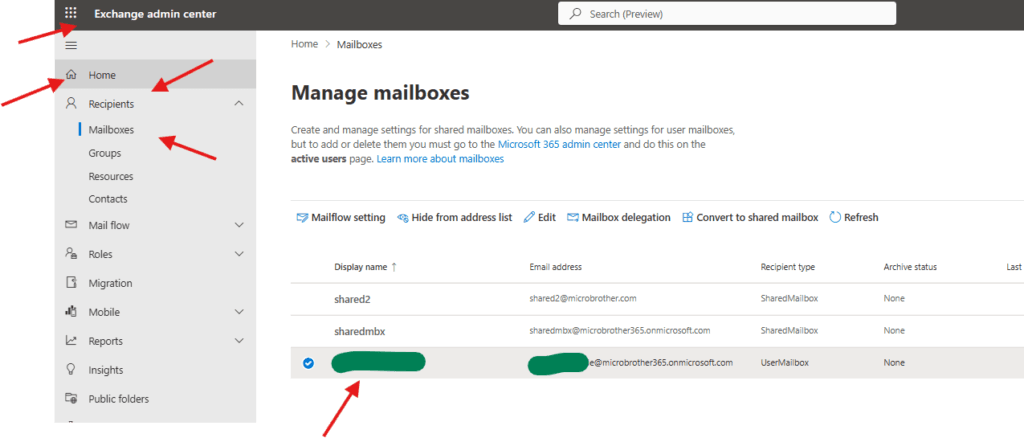
Open EXO admin center : https://admin.cloud.microsoft/exchange
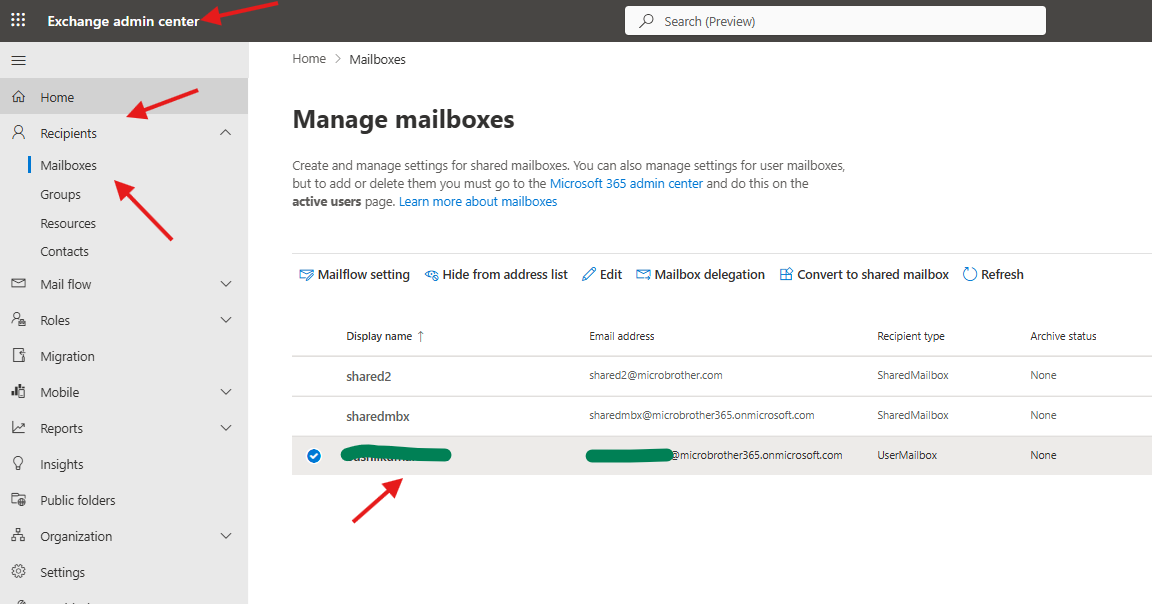
Navigate to EXO–> Recipients –> Mailboxes–> select individual mailbox
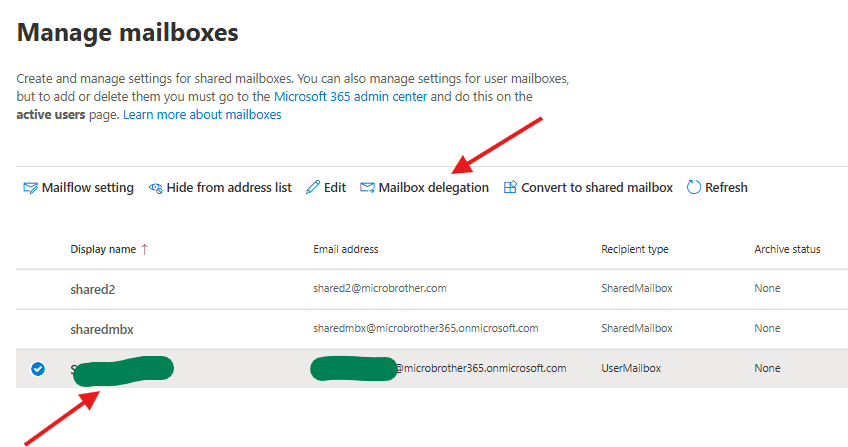
click on mailbox delegation
or simply click on the mailbox and then click on delegation tab
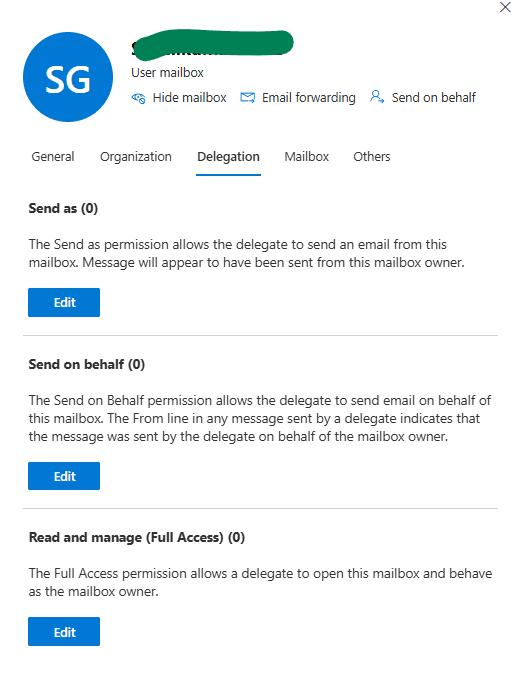
you will be able to see 3 below attributes
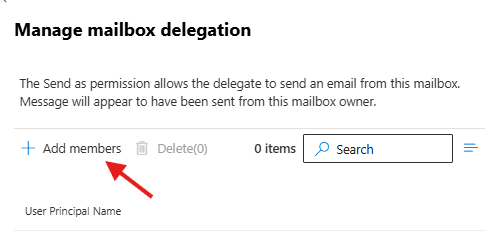
Send as: The Send as permission allows the delegate to send an email from this mailbox. Message will appear to have been sent from this mailbox owner
Send on behalf : The Send on Behalf permission allows the delegate to send email on behalf of this mailbox. The From line in any message sent by a delegate indicates that the message was sent by the delegate on behalf of the mailbox owner.
Read and manage (Full Access): The Full Access permission allows a delegate to open this mailbox and behave as the mailbox owner.
you can click on edit option in front of the attribute and add member as per the requirement
PowerShell script for above manual task
# ================================
# Script: Add Mailbox Delegation
# Author: Microbrother admin
# Works for: Full Access, Send As, Send on Behalf
# ================================

# Install Exchange Online Module (Run once)
# Install-Module ExchangeOnlineManagement -Force

Import-Module ExchangeOnlineManagement

# Connect to Exchange Online
Connect-ExchangeOnline

# -------------------------
# INPUT VALUES
# -------------------------
$MailboxOwner = "user1@microbrother.com"      # Mailbox to be delegated
$DelegateUser = "user2@microbrother.com"     # User who will get access

# -------------------------
# 1) FULL ACCESS PERMISSION
# -------------------------
Write-Host "Granting Full Access Permission..." -ForegroundColor Yellow

Add-MailboxPermission -Identity $MailboxOwner `
    -User $DelegateUser `
    -AccessRights FullAccess `
    -InheritanceType All `
    -AutoMapping $true

Write-Host "Full Access granted successfully!" -ForegroundColor Green

# -------------------------
# 2) SEND AS PERMISSION
# -------------------------
Write-Host "Granting Send As Permission..." -ForegroundColor Yellow

Add-RecipientPermission -Identity $MailboxOwner `
    -Trustee $DelegateUser `
    -AccessRights SendAs `
    -Confirm:$false

Write-Host "Send As granted successfully!" -ForegroundColor Green

# -------------------------
# 3) SEND ON BEHALF PERMISSION
# -------------------------
Write-Host "Granting Send on Behalf Permission..." -ForegroundColor Yellow

Set-Mailbox -Identity $MailboxOwner `
    -GrantSendOnBehalfTo @{Add=$DelegateUser}

Write-Host "Send on Behalf granted successfully!" -ForegroundColor Green

# -------------------------
# VERIFY PERMISSIONS
# -------------------------
Write-Host "`nVerifying permissions..." -ForegroundColor Cyan

Write-Host "`nFull Access:" -ForegroundColor Magenta
Get-MailboxPermission -Identity $MailboxOwner | Where-Object {
    $_.User -like "*$DelegateUser*" -and $_.AccessRights -contains "FullAccess"
} | Format-Table User, AccessRights, IsInherited

Write-Host "`nSend As:" -ForegroundColor Magenta
Get-RecipientPermission -Identity $MailboxOwner | Where-Object {
    $_.Trustee -like "*$DelegateUser*" -and $_.AccessRights -contains "SendAs"
} | Format-Table Trustee, AccessRights

Write-Host "`nSend on Behalf:" -ForegroundColor Magenta
(Get-Mailbox -Identity $MailboxOwner).GrantSendOnBehalfTo

# Disconnect
Disconnect-ExchangeOnline -Confirm:$false

Write-Host "`nMailbox Delegation completed successfully!" -ForegroundColor Green
We are done here
Conclusion:
Post reading above article reader will be able to manage mailbox delegation using EXO
Also you can read https://microbrother.com/manage-email-apps-mobile-devices-settings/ this article to manage Email apps & mobile devices settings of a mailbox
Thank you 😇